

Usually, Google direct traffic means visitors are accessing you directly rather than through search engines or social media. Nevertheless, a significant amount of direct traffic can be still unfounded due to the absence or the rupture of the tracking system.



What is Direct Traffic in Google Analytics?
Direct traffic in Google Analytics refers to those visits to your website when the users have not clicked any links from other websites. These are the people who are already familiar with your site and come to it directly. Such traffic indicates strong brand awareness as users are able to recall the name or the link of your website.
Table of Contents

Where Does Direct Traffic Come From?
High direct traffic can be confusing because it sometimes hides where visitors actually came from. Here are ways to reduce direct traffic Google Analytics definition errors:
Manually Typed URLs
When users directly type your website address into their browser, it counts as direct traffic.

Bookmarked Links in Browsers
Visitors who access your site through saved bookmarks generate direct traffic.

Links in PDFs or Documents
Clicks on links inside offline files like PDFs, Word docs, or presentations often show up as direct traffic.

Links in WhatsApp or Text Messages
Links shared through WhatsApp or SMS usually don’t pass referral data, so they appear as direct traffic.

Secure to Non-Secure Transitions
When users move from a secure site to a non-secure one, referral data is lost and the visit is recorded as direct traffic.

It is direct traffic when a visitor lands on your website without coming from another site. The user knows where your brand exists or has already saved your website in most cases. Sometimes, direct traffic in Google Analytics might show up as a result of some tracking issues. Here are its main sources:
- Manually Typed URLs
If people put your website’s link in their browser and go there, we call this direct traffic in Google Analytics. It highlights the fact that they know your brand by name or your web address. Manual typing is a sign of loyalty and awareness because visitors are making an effort to find your site.
- Bookmarked Links in Browsers
Many visitors bookmark websites they like. When they click these saved links, the visit is counted as direct traffic Google Analytics. This is common for loyal customers or users who regularly check your products or updates. Bookmarked visits are good because they show repeat interest in your site.
- Links in PDFs or Documents
If your site link is clicked from a PDF, Word file, or any offline material, Google Analytics direct traffic definition applies. Analytics cannot see where these clicks come from, so it groups them under direct traffic. This happens because documents do not pass referral data like websites do.
- Links in WhatsApp or Text Messages
If someone shares your website link in a chat app like WhatsApp or sends it through SMS, direct traffic meaning in Google Analytics applies. Messaging apps don’t send referral data, so Analytics marks these visits as direct. Many brands see high traffic from these “dark social” sources.
- Secure to Non-Secure Transitions
If your site has both secure (HTTPS) and non-secure (HTTP) pages, traffic between them can appear as direct. What does direct traffic mean in Google Analytics? In this case, it means referral data was lost due to security differences. Moving your entire website to HTTPS can solve this.
How to View Direct Traffic in Google Analytics
You can see Google Analytics direct traffic meaning in two views: User Acquisition View and Traffic Acquisition View.
User Acquisition View
This view shows how many unique people visit your website directly. It focuses on users, not visits.
- Total Users: Shows the total number of people who visited directly. Even if one person visits five times, they’re only counted once.
- New Users: People visiting for the first time. They might have discovered your brand or typed your web address after seeing it elsewhere.
- Returning Users: Visitors who’ve been to your website before and came back. High returning users mean your audience trusts and enjoys your content.
This view is great for tracking audience growth and loyalty. More new users show effective marketing, while more returning users show brand strength.
Traffic Acquisition View
This view focuses on the total sessions from direct traffic. Sessions are complete visits and can include multiple pages.
- Total Sessions: Shows the total number of times your site was visited. A single visitor visiting three times counts as three sessions.
- New Sessions: Visits from first-time users. These numbers help track growth.
- Returning Sessions: Visits from people who already know your site. High numbers here mean your site keeps visitors coming back.
This view is useful to see how often people visit your site, not just how many people. It shows audience activity and repeat engagement.
How to Reduce Direct Traffic
High direct traffic can be confusing because it sometimes hides where visitors actually came from. Here are ways to reduce direct traffic Google Analytics definition errors:

Implement Proper UTM Tagging
Ensure Correct Google Analytics Setup

Switch Entirely to HTTPS
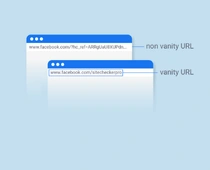
Avoid Using Vanity URLs or Redirects
- Implement Proper UTM Tagging
UTM tags are small codes added to links. They tell Analytics where traffic comes from. If you share links in PDFs, WhatsApp, SMS, or printed ads, always use UTM tags.
Example: https://www.yoursite.com?utm_source=pdf&utm_medium=link
This ensures visits are tracked under the correct source instead of being marked as direct traffic in Google Analytics.
- Ensure Correct Google Analytics Setup
If your Analytics tracking code is missing on some pages, traffic from those pages will show up as direct. Make sure the code is installed everywhere, including landing pages, blogs, and product pages. Regular audits ensure data accuracy and reduce direct traffic meaning in Google Analytics errors.
- Switch Entirely to HTTPS
If your site has both HTTP and HTTPS pages, moving between them will remove referral data. Switch all pages to HTTPS for security and better data tracking. This improves trust, SEO, and reduces incorrect direct traffic Google Analytics numbers.
- Avoid Using Vanity URLs or Redirects
Using too many redirects or custom short links may confuse Analytics. These links often remove referral details, making visits look like Google Analytics direct traffic. Instead, use proper URLs and add UTM tags to campaigns.
Final Thoughts
Understanding direct traffic in Google Analytics will help you improve your website data. Direct traffic could show goal conversion due to brand loyalty, but at the same time, it's a container for other traffic sources if not set up properly for tracking. Making your direct traffic figures as credible as possible will best aid your marketing decision-making, and that can happen when you use UTM tags, go HTTPS, and avoid too many redirects.


FAQs About Direct Traffic
Direct traffic is not bad. It shows that users know your brand and type your link directly. However, too much direct traffic may mean Google Analytics direct traffic definition is not accurate because of missing or incorrect tracking.
Yes, bots and crawlers can cause direct traffic Google Analytics numbers to rise. If you don’t filter them out, they can make your traffic data look higher than it really is.
Your direct traffic in Google Analytics may be high because:
- You share many links through PDFs, messages, or offline media.
- There are errors in your Analytics setup.
- Your site mixes HTTP and HTTPS pages.
- Bots are not filtered from your data.
You can set up UTM tags, fix your Analytics setup, and enable bot filtering to see accurate data. These steps will reduce direct traffic meaning in Google Analytics confusion and help you understand your real visitors better.
Our Services


Get a free website audit