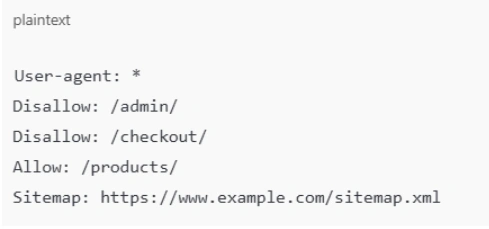
- Controls Which Pages Search Engines and AI Engines Can Crawl
What does robots.txt do? Among its primary tasks is to manage which pages bots are allowed to access. Perhaps you do not wish Google to crawl your test or admin pages. Through robots.txt, you can prevent search bots and AI bots from wasting their time there.
- Prevents Indexing of Sensitive or Unwanted Pages
Occasionally, sites have pages you don't wish users to discover through Google Search – your admin login, for example, or a test version of your site. What do you use robots.txt for? It prevents those pages from being presented in search results.
- Enhances Website Security by Hiding Critical System Files
What do robots.txt need to work fully? A neat, accurate robots.txt file assists in concealing system files which hackers or bots should not access. Therefore, robots.txt can enhance your website's security as well. This is how much robots.txt file matters in SEO and website security.
Best Practices for Robots.txt
It is nice to know what is robots txt file. But applying it correctly is nicer. Below are some best practices that assist you in writing a tidy, effective robots.txt for SEO.
- Use a New Line for Each Directive
When you write a robots.txt file, each rule or directive should be on its own line. This makes it clear for bots and humans to read.
- Use Each User-Agent Only Once
A user-agent refers to the name of the search engine spider, such as Googlebot. Write rules for a single bot only in your robots.txt. It prevents confusion.
- Use $ to Indicate the End of a URL
When you wish to block an exact page or file, use $ at the end. For instance, Disallow: /page.html$ only blocks page.html but not other pages starting with the same words.
- Use the Hash Symbol to Add Comments
Use # to write comments inside robots.txt. Comments help you or your team understand why a rule is there.
- Use Separate Robots.txt Files for Different Subdomains
If your site has subdomains, like blog.example.com and shop.example.com, each one needs its own robots.txt file. They don’t share one file.
- Add All the XML Sitemap Links in the Robots.txt File
A clever hack is to include your sitemap link in your robots.txt file. This informs bots where your XML sitemap is located. So bots can crawl your site more quickly. If you already know what a sitemap is, this is only common sense!