What is a Sitemap?

A sitemap is generally a text file containing a listing of the URLs that are seen on a website. It allows search engines like Google, Bing, or AI bots to discover the content of the website. Among the SEO techniques, creating a proper sitemap is the best to get your site noticed in Google's search results.

What are the types of sitemaps?

There are mainly two types of sitemaps in SEO. Both play a special role in making your site easy to use and easy to find. One is for your visitors, the other is for search engines and crawlers.

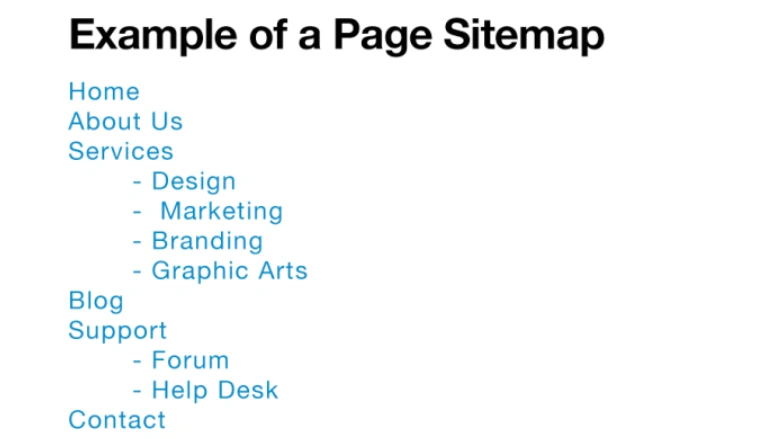
  • HTML Sitemap (Only for Users)

An HTML sitemap is made for people who visit your website. It shows a simple list or map of all the main pages. Visitors use it to find pages that may not be easy to find from the main menu.

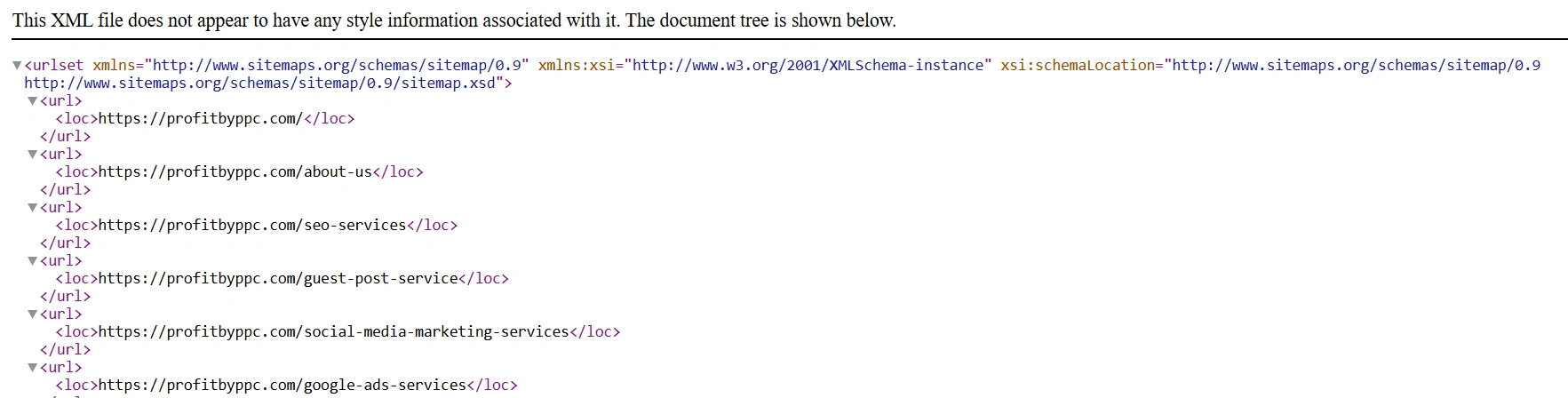
  • XML Sitemap (For Search Engine & AI Crawlers)

An XML sitemap is created for search engines and AI spiders. It is a document containing all your significant URLs. It makes Google and other search engines crawl, read, and index your website quicker.

It can include:

  • Webpage URLs: All your important pages and posts.
  • Video URLs: If you share videos, these get listed too.
  • News URLs: If you run a news section or blog updates.
  • Image URLs: Helps Google index your images for Google Images.

So, when someone asks “what is sitemap in SEO?” – the XML sitemap is the answer.

Having a sitemap is nice, but keeping it updated and correct is much more important. Here are some easy tips for sitemap best practices:

  • Keep Your Sitemap Current with New Pages

An update in your sitemap must accompany new page creation, blog entry, video, or image. It is important for Google and other spiders to be aware of your content update.

  • Use a Limited Number of URLs per Sitemap File

One XML sitemap must not include more than 50,000 URLs or 50 MB (uncompressed) in size. For larger websites, it should be split into numerous sitemaps.

  • Submit Sitemap in Google Search Console and Bing Webmaster Tools

Once your sitemap is generated, it must be submitted to Bing Webmaster Tools and Google Search Console. This instructs search engines to crawl it. It's an essential step for good sitemap in SEO practice.

  • Do Not Add Broken or Invalid URLs in Sitemap

Be sure to check your sitemap for broken pages or incorrect pages. Broken pages waste crawl budget and can damage your SEO.

  • Avoid Listing Duplicate or Noindex Pages

Don't include pages that have been set to noindex in your sitemap. Don't repeat the same page in your list either. Keep your sitemap clean, and search engines will trust your site more.

Why XML Sitemaps Matter for SEO?

XML sitemaps help search engines discover, crawl, and index your website pages more efficiently for better SEO performance.

Helps Search Engines Discover Your URLs and Index Pages

Helps Search Engines to Discover Orphan pages

Give Insights via Search Console Reports

An XML sitemap is made for search engines and AI spiders. It is a document containing all your important URLs. It makes Google and other search engines faster in crawling, reading, and indexing your website.

  • Helps Search Engines Discover Your URLs and Index Pages

With the help of XML sitemaps, search engines can note with ease which pages are available on your site.

  • Helps Search Engines to Discover Orphan pages

Sitemaps help identify and index pages that aren’t linked internally (orphan pages), ensuring no valuable content is missed by search engines.

  • Give Insights via Search Console Reports

Once your XML sitemap is added to Google Search Console, it will show you:

  • How many pages were submitted.
  • How many pages were actually indexed.
  • If there are any errors in your sitemap.

This is a big benefit of sitemaps – you can fix problems faster and keep your site healthy.


Best Method to Insert Sitemaps as Per the Site

Various sites require different methods to insert a sitemap. Let's make it easy.

For Small or Static Sites

If your website is small with minimal pages, you may handcraft your sitemap. Just use an online tool, save the XML file and post it on your site. You can also generate an HTML sitemap to assist visitors.

For Large, Dynamic Websites

Large sites such as e-commerce websites or blogs with many pages require an automated process. Plugins and tools make your sitemap refresh every time you create or remove a page.


Tools for Sitemap Generation

It is easy to generate a sitemap when using the correct tools. Here are some famous ones.

For WordPress Sites

If you are on WordPress, you are in luck. Plug-ins such as Yoast SEO or Rank Math automatically generate and update your XML sitemaps for you. They also assist with other SEO work.

For Custom or Static Sites

If your site is custom-coded or an HTML-only site, make use of services such as XML-sitemaps.com or Screaming Frog. They crawl your site and build your sitemap with the click of a button or two.


Final Thoughts – Is Sitemap Important for SEO?

So, what is a sitemap? It's your website's road map for Google. It's a brilliant map that informs search engines and artificial intelligence crawlers where your pages, videos, images, and news are located. It assists them in faster indexing of your content.

Sitemaps ensure that none of your essential pages are missing. They also improve your ranking. They allow search engines to comprehend the entire structure of your site. If you want to succeed in SEO, make a new, clean, and updated sitemap, then submit it to Google Search Console and Bing.

Simply put – if you at some point ask yourself, “what is sitemap in SEO and why is it important?” – a good sitemap can propel your website to higher search results, bring more visitors, and maintain its power in the online world is an easy answer. Therefore, don’t turn a blind eye to your sitemap. Create it. Submit it. Keep it updated. And be a witness of your SEO development!

FAQs of What is a Sitemap and Why it Matters for SEO

XML sitemap is ideal for use in SEO. It speaks to search engines and AI spiders directly. HTML sitemap is for users but doesn't do much for search engine spiders.
A sitemap may include up to 50,000 URLs. If you have more than that, divide it into smaller sitemaps and point to them in a sitemap index file.
No, not every small site does. But if your site is big, new, or disorienting, a sitemap is a lifesaver. So, is sitemap essential for SEO? Yes!
You can verify your sitemap through Google Search Console. Add it there. In case of errors, Google will indicate what needs correction. Test your sitemap always before adding.